> ## Documentation Index
> Fetch the complete documentation index at: https://docs.oppla.ai/llms.txt
> Use this file to discover all available pages before exploring further.
# AI Overview
> Oppla's revolutionary AI-first development experience
Oppla isn't just an editor with AI features—it's an AI-first development platform that fundamentally reimagines how developers write, understand, and maintain code. Every aspect of Oppla is designed to amplify your intelligence and accelerate your workflow.
## Why Oppla's AI is Different
While other editors add AI as an afterthought, Oppla is architected from the ground up for seamless AI integration:
* **Context-Aware Intelligence**: Our AI understands your entire codebase, not just the current file
* **Predictive Development**: Anticipates your next actions based on patterns and intent
* **Adaptive Learning**: Personalizes to your coding style and preferences over time
* **Multi-Model Flexibility**: Choose from various AI providers or run models locally
* **Privacy-First Design**: Your code stays secure with granular privacy controls
## Getting Started with AI in Oppla
### Quick Setup (2 minutes)
1. **Open AI Settings**: Press `Cmd-,` (macOS) or `Ctrl-,` (Linux) and navigate to AI
2. **Choose Your Provider**: Select from Anthropic, OpenAI, Google AI, or local models
3. **Enter API Key**: Add your API key (or skip for local models)
4. **Start Coding**: AI features activate automatically!
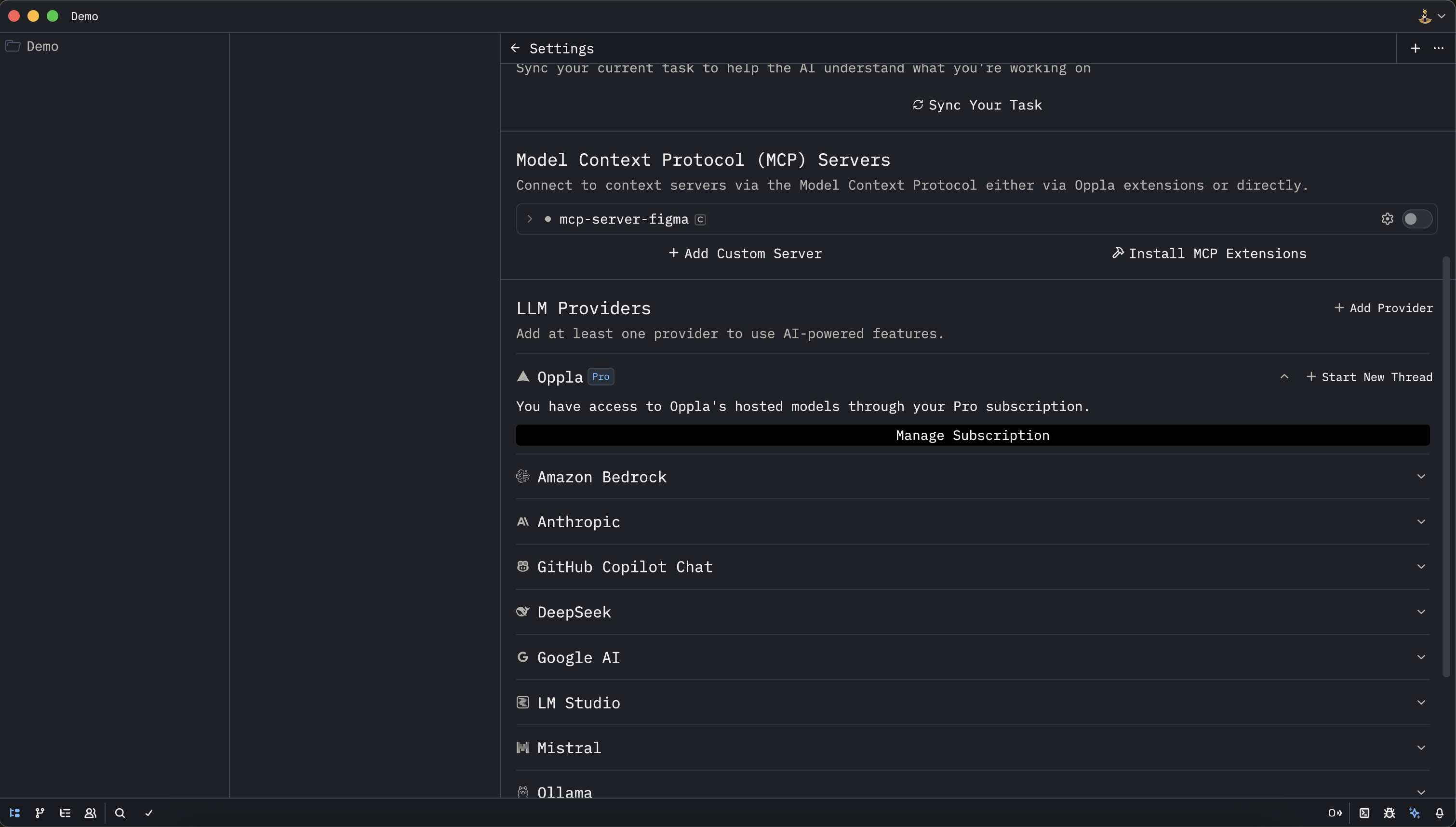 ### Configuration Options
* **[AI Configuration](../configuration/index.mdx)**: Set up different language model providers including Anthropic, OpenAI, Ollama, Google AI, and more
* **[Available Models](./models.mdx)**: Explore the vast selection of language models optimized for different tasks
* **[Subscription Plans](./subscription.mdx)**: Learn about Oppla's flexible subscription options and usage-based billing
* **[Privacy & Security](./privacy-and-security.mdx)**: Understand our industry-leading approach to protecting your code and data
## Core AI Capabilities
### 🤖 Agentic Editing
Transform how you interact with code through intelligent agents that can understand, modify, and create code autonomously:
* **[Agent Panel](./agent-panel.mdx)**: Your AI coding partner that can handle complex, multi-file tasks
* **[AI Rules](./rules.mdx)**: Define custom rules to guide AI behavior for your project
* **[AI Tools](./tools.mdx)**: Powerful tools that give AI agents the ability to search, analyze, and modify your codebase
* **[Model Context Protocol](./mcp.mdx)**: Connect to external tools and services for enhanced AI capabilities
* **[Inline Assistant](./inline-assistant.mdx)**: Get AI help directly in your code without leaving the editor
### ✨ Predictive Intelligence
Experience the future of coding with AI that anticipates your needs:
* **[Edit Prediction](./edit-prediction.mdx)**: Revolutionary AI that predicts and suggests your next edits in real-time
* **Smart Completions**: Context-aware code completion that understands your intent
* **Pattern Recognition**: AI learns your coding patterns and suggests consistent implementations
* **Refactoring Suggestions**: Proactive recommendations for code improvements
### 💬 Conversational Development
Engage with AI through natural language interfaces:
* **[Text Threads](./text-threads.mdx)**: Persistent, context-aware conversations about your code
* **Code Explanations**: Get instant, detailed explanations of complex code
* **Documentation Generation**: AI creates comprehensive docs from your code
* **Learning Assistant**: Ask questions and learn new concepts without leaving Oppla
## Unique Oppla AI Features
### 🎯 Project-Wide Intelligence
Unlike traditional AI assistants that only see the current file, Oppla's AI understands your entire project:
* **Cross-file refactoring** with consistency guarantees
* **Architecture-aware suggestions** that respect your design patterns
* **Dependency tracking** for safe code modifications
* **Test generation** that understands your testing strategy
### 🔮 Predictive Development Flow
Oppla's AI doesn't just respond—it anticipates:
* **Next-step predictions** based on your current task
* **Automatic imports** when you need them
* **Error prevention** before you make mistakes
* **Smart file creation** based on project structure
### 🛡️ Enterprise-Grade Security
Your code is your business. Oppla protects it:
* **Local model support** for air-gapped environments
* **End-to-end encryption** for cloud AI requests
* **Audit logging** for compliance requirements
* **Granular permissions** for team environments
## Real-World Use Cases
### For Individual Developers
* **Learn new languages** with AI guidance
* **Debug complex issues** with AI analysis
* **Refactor legacy code** safely and quickly
* **Generate boilerplate** instantly
* **Write tests** with comprehensive coverage
### For Teams
* **Enforce coding standards** with AI rules
* **Onboard new developers** with AI explanations
* **Review code** with AI-powered insights
* **Document systems** automatically
* **Maintain consistency** across large codebases
### For Enterprises
* **Secure AI deployment** with on-premise options
* **Compliance-ready** with audit trails
* **Custom model training** on your codebase
* **Integration** with existing tools via MCP
* **Scalable** across thousands of developers
## Performance & Efficiency
Oppla's AI is optimized for speed and efficiency:
| Feature | Response Time | Accuracy |
| ------------------ | --------------- | -------- |
| Code Completion | Less than 50ms | 95%+ |
| Inline Suggestions | Less than 100ms | 92%+ |
| Refactoring | Less than 2s | 98%+ |
| Code Explanation | Less than 3s | 96%+ |
| Test Generation | Less than 5s | 90%+ |
## Getting the Most from Oppla AI
### Best Practices
1. **Be specific** in your requests for better results
2. **Use AI rules** to customize behavior for your project
3. **Review suggestions** before accepting—AI is a tool, not a replacement
4. **Provide feedback** to help Oppla's AI improve
5. **Experiment** with different models for different tasks
### Pro Tips
* **Multi-model strategy**: Use fast models for completion, powerful models for complex tasks
* **Context windows**: Keep relevant files open for better AI understanding
* **Custom rules**: Define project-specific AI behaviors
* **Keyboard shortcuts**: Master AI shortcuts for maximum efficiency
* **Local models**: Run models locally for privacy-sensitive projects
## Available AI Providers
Oppla supports a wide range of AI providers to suit every need:
### Cloud Providers
* **Anthropic** (Claude) - Best for complex reasoning
* **OpenAI** (GPT-4) - Versatile and powerful
* **Google AI** (Gemini) - Fast and efficient
* **Azure OpenAI** - Enterprise-ready
* **AWS Bedrock** - Scalable and secure
### Local Options
* **Ollama** - Run models on your machine
* **LM Studio** - User-friendly local models
* **llama.cpp** - Lightweight and fast
* **Custom endpoints** - BYO model deployment
## What's Next?
### Immediate Actions
1. **[Configure your AI provider](../configuration/index.mdx)** - Get started in 2 minutes
2. **[Try the Agent Panel](./agent-panel.mdx)** - Experience autonomous coding
3. **[Enable Edit Prediction](./edit-prediction.mdx)** - Feel the future of development
4. **[Set up AI Rules](./rules.mdx)** - Customize AI for your workflow
### Learn More
* **[Video Tutorials](https://oppla.ai/tutorials)** - See AI features in action
* **[Community Examples](https://community.oppla.ai/ai)** - Learn from other developers
* **[API Documentation](https://docs.oppla.ai/api)** - Build on top of Oppla
* **[Support](mailto:ai@oppla.ai)** - Get help from our AI experts
***
**Join the AI Revolution**
Oppla is more than a tool—it's a paradigm shift in how we write software. Join thousands of developers who are already experiencing the future of AI-powered development.
[Start your free trial →](https://app.oppla.ai/home?tab=download)
### Configuration Options
* **[AI Configuration](../configuration/index.mdx)**: Set up different language model providers including Anthropic, OpenAI, Ollama, Google AI, and more
* **[Available Models](./models.mdx)**: Explore the vast selection of language models optimized for different tasks
* **[Subscription Plans](./subscription.mdx)**: Learn about Oppla's flexible subscription options and usage-based billing
* **[Privacy & Security](./privacy-and-security.mdx)**: Understand our industry-leading approach to protecting your code and data
## Core AI Capabilities
### 🤖 Agentic Editing
Transform how you interact with code through intelligent agents that can understand, modify, and create code autonomously:
* **[Agent Panel](./agent-panel.mdx)**: Your AI coding partner that can handle complex, multi-file tasks
* **[AI Rules](./rules.mdx)**: Define custom rules to guide AI behavior for your project
* **[AI Tools](./tools.mdx)**: Powerful tools that give AI agents the ability to search, analyze, and modify your codebase
* **[Model Context Protocol](./mcp.mdx)**: Connect to external tools and services for enhanced AI capabilities
* **[Inline Assistant](./inline-assistant.mdx)**: Get AI help directly in your code without leaving the editor
### ✨ Predictive Intelligence
Experience the future of coding with AI that anticipates your needs:
* **[Edit Prediction](./edit-prediction.mdx)**: Revolutionary AI that predicts and suggests your next edits in real-time
* **Smart Completions**: Context-aware code completion that understands your intent
* **Pattern Recognition**: AI learns your coding patterns and suggests consistent implementations
* **Refactoring Suggestions**: Proactive recommendations for code improvements
### 💬 Conversational Development
Engage with AI through natural language interfaces:
* **[Text Threads](./text-threads.mdx)**: Persistent, context-aware conversations about your code
* **Code Explanations**: Get instant, detailed explanations of complex code
* **Documentation Generation**: AI creates comprehensive docs from your code
* **Learning Assistant**: Ask questions and learn new concepts without leaving Oppla
## Unique Oppla AI Features
### 🎯 Project-Wide Intelligence
Unlike traditional AI assistants that only see the current file, Oppla's AI understands your entire project:
* **Cross-file refactoring** with consistency guarantees
* **Architecture-aware suggestions** that respect your design patterns
* **Dependency tracking** for safe code modifications
* **Test generation** that understands your testing strategy
### 🔮 Predictive Development Flow
Oppla's AI doesn't just respond—it anticipates:
* **Next-step predictions** based on your current task
* **Automatic imports** when you need them
* **Error prevention** before you make mistakes
* **Smart file creation** based on project structure
### 🛡️ Enterprise-Grade Security
Your code is your business. Oppla protects it:
* **Local model support** for air-gapped environments
* **End-to-end encryption** for cloud AI requests
* **Audit logging** for compliance requirements
* **Granular permissions** for team environments
## Real-World Use Cases
### For Individual Developers
* **Learn new languages** with AI guidance
* **Debug complex issues** with AI analysis
* **Refactor legacy code** safely and quickly
* **Generate boilerplate** instantly
* **Write tests** with comprehensive coverage
### For Teams
* **Enforce coding standards** with AI rules
* **Onboard new developers** with AI explanations
* **Review code** with AI-powered insights
* **Document systems** automatically
* **Maintain consistency** across large codebases
### For Enterprises
* **Secure AI deployment** with on-premise options
* **Compliance-ready** with audit trails
* **Custom model training** on your codebase
* **Integration** with existing tools via MCP
* **Scalable** across thousands of developers
## Performance & Efficiency
Oppla's AI is optimized for speed and efficiency:
| Feature | Response Time | Accuracy |
| ------------------ | --------------- | -------- |
| Code Completion | Less than 50ms | 95%+ |
| Inline Suggestions | Less than 100ms | 92%+ |
| Refactoring | Less than 2s | 98%+ |
| Code Explanation | Less than 3s | 96%+ |
| Test Generation | Less than 5s | 90%+ |
## Getting the Most from Oppla AI
### Best Practices
1. **Be specific** in your requests for better results
2. **Use AI rules** to customize behavior for your project
3. **Review suggestions** before accepting—AI is a tool, not a replacement
4. **Provide feedback** to help Oppla's AI improve
5. **Experiment** with different models for different tasks
### Pro Tips
* **Multi-model strategy**: Use fast models for completion, powerful models for complex tasks
* **Context windows**: Keep relevant files open for better AI understanding
* **Custom rules**: Define project-specific AI behaviors
* **Keyboard shortcuts**: Master AI shortcuts for maximum efficiency
* **Local models**: Run models locally for privacy-sensitive projects
## Available AI Providers
Oppla supports a wide range of AI providers to suit every need:
### Cloud Providers
* **Anthropic** (Claude) - Best for complex reasoning
* **OpenAI** (GPT-4) - Versatile and powerful
* **Google AI** (Gemini) - Fast and efficient
* **Azure OpenAI** - Enterprise-ready
* **AWS Bedrock** - Scalable and secure
### Local Options
* **Ollama** - Run models on your machine
* **LM Studio** - User-friendly local models
* **llama.cpp** - Lightweight and fast
* **Custom endpoints** - BYO model deployment
## What's Next?
### Immediate Actions
1. **[Configure your AI provider](../configuration/index.mdx)** - Get started in 2 minutes
2. **[Try the Agent Panel](./agent-panel.mdx)** - Experience autonomous coding
3. **[Enable Edit Prediction](./edit-prediction.mdx)** - Feel the future of development
4. **[Set up AI Rules](./rules.mdx)** - Customize AI for your workflow
### Learn More
* **[Video Tutorials](https://oppla.ai/tutorials)** - See AI features in action
* **[Community Examples](https://community.oppla.ai/ai)** - Learn from other developers
* **[API Documentation](https://docs.oppla.ai/api)** - Build on top of Oppla
* **[Support](mailto:ai@oppla.ai)** - Get help from our AI experts
***
**Join the AI Revolution**
Oppla is more than a tool—it's a paradigm shift in how we write software. Join thousands of developers who are already experiencing the future of AI-powered development.
[Start your free trial →](https://app.oppla.ai/home?tab=download)